Showing posts with label freeware. Show all posts

Wednesday, August 11, 2010

Dashcode and Eclipse

Well I've been working on becoming a web programmer for a couple months now. I have created a couple applications that don't really do anything exciting, but the level of app complexity is increasing. I have even added an RSS feed so that there is a way to keep people updated with my javascript adventures. To check out my javascript page, go to: http://homepages.uc.edu/~brooksbl/js/

The thing that really helps with writing code is a syntax program that can help you see if you typed your code correctly or not. I was led to eclipse, an open source platform for writing code, by my friend and programming mentor Joey. I also kept seeing a program known as Dashcode on my Mac and tested it out a few times. Here are some screen shots of the two applications.

Eclipse:Link

Dashcode:


It might not look like much, but they are both helpful. The real key is having something that can pinpoint your mistakes, and both have that capability. Dashcode has tons of templates to make some real powerful web applications. You will probably see some of those as I get a grasp on it. I am just glad that I didn't have to pay for either one.

Sunday, August 8, 2010

Ajax of All Trades

The phrase "A jack of all trades, master of none" has been easily applicable to me for years. I've professionally done many different things, and even more as a hobbyist or DIY-er. Recently I've been involved in quite a range of activities. I've been working on remodeling our bathroom (click here for pics). I've been keeping my company's web page up to date. I've been working on my capstone project for my Bachelor's degree (a future post about it will come). I picked up an electric guitar and have been fiddling with it. On top of all these activities, I feel compelled to broaden my skillset further.

I will be graduating from the University of Cincinnati with a bachelors degree in Organizational Leadership and a minor in Business. However, as I look to the future I see the world of software to be taking a role that can't be ignored. I have been a hobbyist programmer since I was in high school, but I have never learned any useful programming languages. Now I am beginning to start into Javascript and Ajax. I've already been able to use my javascript skills to enhance the free quote widget on the right of this page.

To enhance my learning, I found some free resources available to me through w3schools and the University of Cincinnati. I am excited about learning to program web pages, and hope to migrate this blog to my own domain within the next six months. I will use that location to experiment with the programming that I am learning. I've even contemplated taking classes at Cincinnati State Technical College after I graduate from UC. Unfortunately it is too late for me to get a minor in Computer Science from UC, which I would have done if I knew about it three years ago.

Hopefully, all of this will help me to stay a jack of all trades, but instead of a master of none, I hope to be a master of a few. The key areas that I want to master: My understanding of leadership and Ajax.

Monday, March 24, 2008

Google Sketchup - CAD for the masses

In recent years, Google has created a plethora of online and downloadable programs.  Blogger is one, Google books, Google Earth, etc.  One of these programs that quickly became one of my favorites is Sketchup.

Sketchup is a Computer Aided Design (CAD) program created by Google.  Sketchup has been designed to be a fully functional CAD program that combines a wonderful ease of use with a low price tag of  $0.  I found Google Sketchup when I was getting my military training in Pensacola FL.  I just searched for freeware CAD programs and was stunned to find one backed by a company as notable as Google.  I immediately downloaded it and began "sketchup-ing."

When I first started I took the introductory tutorials and then began experimenting.  One of my weaknesses is that I would rather figure things out by trial and error than by just reading the instructions.  This made Sketchup much more difficult for me than it had to be.  It really was as easy to use as they claimed.

Don't mistake ease of use with lack of features, however.  Google packed Sketchup with tons of features including easy texture application, shadow and fog control, style and backdrop settings, and integration with Google Earth.  There are few features in the Pro (bought) version that are not in the free version.  All the features are for various uses from simple scribbling of ideas to movie-set creation complete with scene and shot control.  Google Sketchup has made a stunning program to make CAD available to virtually anyone.

You may have even noticed some of the benefits of Sketchup without even knowing it.  People have used Sketchup to create plans for furniture.  Sketchup has also been used in architectural renderings of future buildings, such as the freedom tower being built on ground zero, etc.  Even the set of the movie "Good Night, and Good luck", directed by George Clooney, was completely designed using Sketchup.  Probably one of the most viewed uses of Google Sketchup however has been its creation of the 3d Warehouse.

The 3d Warehouse is the place for all the Sketchup-ers in the world to upload their designs.  It is a great way to get feedback on your ideas, and a great place to download excellent designs by others.  Whirlpool has uploaded every model in their lineup for people to "try out" when using Sketchup for re-modeling ideas.  As people upload quality renditions of real buildings, they are then added to the database for Google Earth.  In recent editions of Google Earth, 3d Warehouse support has been added.  This has made the Google Earth experience so much better.  You can also add your own designs to your personal copy of Google Earth.  This is great to kind of get an idea of how jealous the neighbors might get when you upgrade to a double-wide.  All told, the 3d Warehouse has added a new dimension to CAD.

Simply put, Sketchup is Amazing.

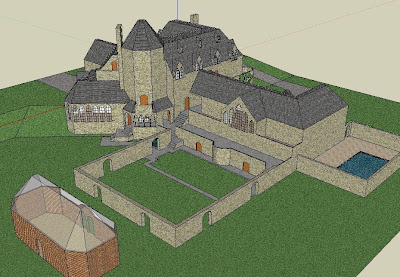
After several months I created this "house," and this afternoon I downloaded the Arc de' Triomphe.  If you have any desires to design a dream home, remodel your house, create a movie set, do some novel landscaping, etc., then download your copy of Sketchup.  It is the ideal program for the average Joe to do any of these things and more.